
[Git] 사용법3 - 협업
Git 사용법 3 협업을 위해서 Git을 사용하는 방법을 알아봅시다.
협업 위한 Git 사용법
여러개의 branch를 만들어서 프로젝트를 진행하게 되면 여러가지 장점이 있습니다. 우선 여려명에서 다양한 작업을 하기 때문에 효율성이 증가하고, 오류가 발생했을때 대처가 가능합니다.
1. 프로젝트 예시
-
git repository 생성 합니다. https://github.com/kooks7/git-collaboration.git
-
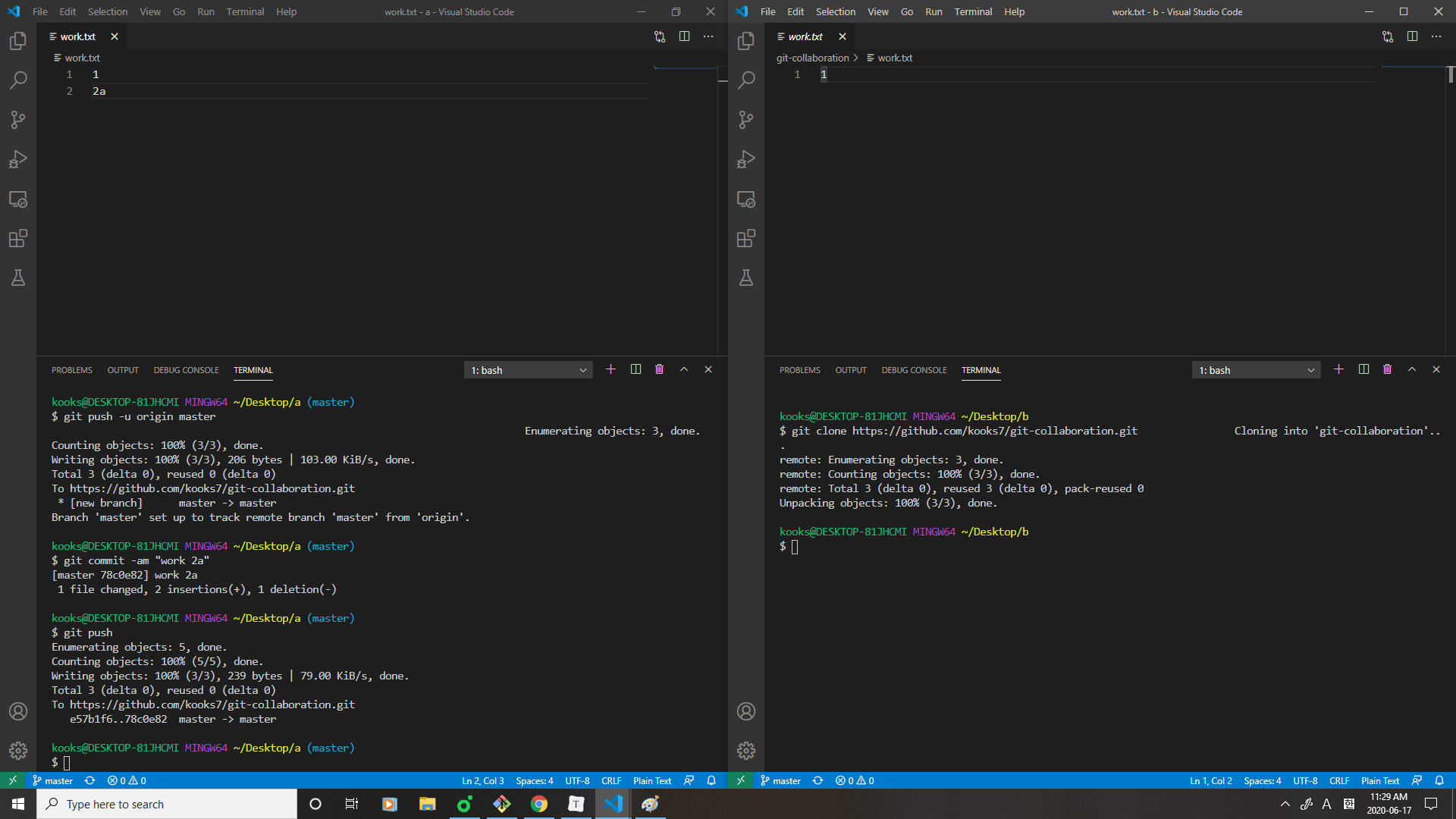
작업한 work.txt을 push 합니다.
-
manage access에서 같이 협업할 동료들을 invite 합니다. 대신 지금은 local에서 새롭게 clone을 하고 두개의 환경에서 실습을 진행하도록 하겠습니다.
-
b에서 새로운 작업을 진행할때 pull을 통해 a와 버전을 맞춰야 합니다. 하지만 b는 그 과정을 생략하고 자신의 작업을 진행합니다.
-
a
1 2a -
b
1
2b
-
-
서로 다른 내용을 push 하게되면 아래와 같은 오류가 발생합니다.
$ git push To https://github.com/kooks7/git-collaboration.git ! [rejected] master -> master (fetch first) error: failed to push some refs to 'https://github.com/kooks7/git-collaboration.git' hint: Updates were rejected because the remote contains work that you do hint: not have locally. This is usually caused by another repository pushing hint: to the same ref. You may want to first integrate the remote changes hint: (e.g., 'git pull ...') before pushing again. hint: See the 'Note about fast-forwards' in 'git push --help' for details. -
해결하기 위해
git pull을 하면 아래와 같이 됩니다.1 <<<<<<< HEAD 2b ======= 2a >>>>>>> 78c0e8247b7b72e0b3fa923c566f3d4b5e87efa8- head는 자신이(b) 작업한 내용이고 아래 내용은 다른 사람이 작업한 내용입니다.
-
병합해서 commit, push을 합니다.
$ git log --all --graph --oneline * fc09ba4 (HEAD -> master) Merge branch 'master' of https://github.com/kooks7/git-collaboration |\ | * 78c0e82 (origin/master, origin/HEAD) work 2a * | ff7368f work 2b |/ * e57b1f6 work 1 -
다시 a에서는 pull을 하고 작업을 합니다.
이러한 작업을 계속해서 반복합니다. 항상 원격저장소에 변경이 없는지 확인하는 습관을 가집시다.
2. pull vs fetch
-
a에서 새로운 작업을 생성합니다.
-
log를 보면
$ git log --all --graph * commit 103a9f5e7b91981273033a3b812ddd82bab93f5f (HEAD -> master) | Author: kooks7 <busanminjae@naver.com> | Date: Wed Jun 17 16:22:36 2020 +0900 | | work 3a | * commit fc09ba4bd3902fc0770e6ba985502884773b9257 (origin/master) |\ Merge: ff7368f 78c0e82 | | Author: kooks7 <busanminjae@naver.com> | | Date: Wed Jun 17 16:13:26 2020 +0900 | | | | Merge branch 'master' of https://github.com/kooks7/git-collaboration | | | * commit 78c0e8247b7b72e0b3fa923c566f3d4b5e87efa8 | | Author: kooks7 <busanminjae@naver.com> | | Date: Wed Jun 17 11:28:46 2020 +0900 | | | | work 2a | | * | commit ff7368fee26725aa7d9e6cf87484f972b42e3851 |/ Author: kooks7 <busanminjae@naver.com> | Date: Wed Jun 17 12:20:23 2020 +0900 | | work 2b |origin/master와head가 다른것을 볼 수 있습니다.$ git status On branch master Your branch is ahead of 'origin/master' by 1 commit. (use "git push" to publish your local commits) nothing to commit, working tree clean즉, 원격 저장소보다 한단계 더 앞서있다고 보면 됩니다.
-
작업내용을 원격저장소에 저장하기 위해
git push를 합니다. -
b에서 작업할 때
pull을 하면 되지만,fetch를 하면 어떻게 될까요? -
b에서
git fetch하고난 후git status$ git log --all --graph --oneline * 103a9f5 (origin/master, origin/HEAD) work 3a * fc09ba4 (HEAD -> master) Merge branch 'master' of https://github.com/kooks7/git-collaboration |\ | * 78c0e82 work 2a * | ff7368f work 2b |/ * e57b1f6 work 1HEAD가 origin/master보다 한 단계 뒤에 있습니다.
-
이를 해결하기 위해
git merge origin/master를 합니다.$ git merge origin/master Updating fc09ba4..103a9f5 Fast-forward work.txt | 1 + 1 file changed, 1 insertion(+)즉
git pull=git fetch+git merge origin/master와 같습니다. -
fetch는 원격 저장소에 있는 이전 버전과 지금 작업하고있는 버전을 조심스럽게 병합할 때 사용합니다.
3. patch
주로 오픈소스같이 권한이 없는 프로젝트에서 작업을 할 때 patch를 사용하게 됩니다.
-
b :기존 프로젝트에서 b가
4b,5bcommit을 추가합니다.1 2ab 3a 4b 5b -
b :
$ git log --all --graph --oneline$ git log --all --graph --oneline * a5828f8 (HEAD -> master) work 5b * a2bdd56 work 4b * 103a9f5 (origin/master, origin/HEAD) work 3a * fc09ba4 Merge branch 'master' of https://github.com/kooks7/git-collaboration |\ | * 78c0e82 work 2a * | ff7368f work 2b |/ * e57b1f6 work 1 -
b :
$ git format-patch 103a9f5origin/master에 patch를 합니다.$ git format-patch 103a9f5 0001-work-4b.patch 0002-work-5b.patch위와 같이 두개의 파일이 생성됩니다. 이 파일을 프로젝트 주인(a)에게 보내주면 됩니다.
-
a :
$ git am -3 -i *.patch파일을 받아서 적용할 수 있습니다.$ git am -3 -i *.patch Commit Body is: -------------------------- work 4b -------------------------- Apply? [y]es/[n]o/[e]dit/[v]iew patch/[a]ccept all: y Applying: work 4b Commit Body is: -------------------------- work 5b -------------------------- Apply? [y]es/[n]o/[e]dit/[v]iew patch/[a]ccept all: y Applying: work 5b
Explore more like this
![[JavasSript] 객체에 대해서](/assets/images/oop.png)
Comments